Watch Videos

Anchor Tags

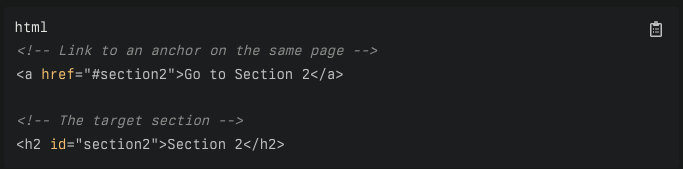
Anchor tags, defined by the <a> element in HTML (Hypertext Markup Language), are used to create hyperlinks on web pages. These hyperlinks allow users to jump from one resource to another with a single click.

When a user clicks on this hyperlink, the browser will make an HTTP request to the URL specified in the href attribute.

AJAX

ajax

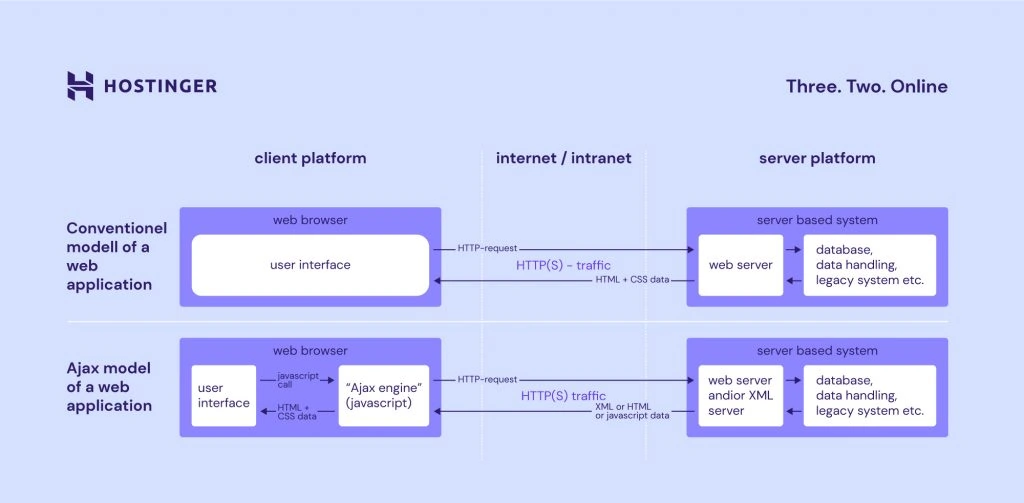
AJAX, which stands for Asynchronous JavaScript and XML, is a set of web development techniques that allows web applications to communicate with a server in the background, without interfering with the current state of the page. Despite its name, AJAX does not necessarily involve XML and can work with other data formats such as JSON, HTML, or plain text. The core of AJAX is the XMLHttpRequest object (or the newer fetch API), which is used to perform asynchronous HTTP requests from JavaScript to the server.

The key to AJAX is the XMLHttpRequest object (or the newer fetch API), which is used to interact with servers. It allows web pages to be updated asynchronously by exchanging small amounts of data with the server behind the scenes. This means that it is possible to update parts of a web page without reloading the whole page.

Key Features

Use of XMLHttpRequest Object: At the heart of AJAX is the XMLHttpRequest object, which is responsible for sending and receiving data asynchronously.

Support for Various Data Formats: Although XML is in the name, AJAX can work with JSON, HTML, and plain text, making it versatile for different types of data exchange.

Modern Alternatives: Thefetch API provides a modern, promise-based alternative to XMLHttpRequest for making asynchronous requests. It is more powerful and flexible, integrating better with other web technologies.

What is AJAX

what_is_ajax

Ajax - Introduction with Example

HTTP

Protocol

HTTP (Hypertext Transfer Protocol) is an application layer protocol in the Internet protocol suite model for distributed, collaborative, hypermedia information systems. It is the foundation of data communication for the World Wide Web, where hypertext documents include hyperlinks to other resources that users can easily access, for example, by a mouse click or by tapping the screen in a web browser.

Evolution of HTTP

HTTP/0.9: The first version of HTTP, simple and limited to GET requests for fetching HTML documents only.

HTTP/1.0: Introduced a structured format adding status codes, methods (GET, POST, HEAD), and MIME types. It was a significant step but lacked features for efficient internet communication.

HTTP/1.1: Brought improvements like persistent connections, chunked transfer encoding, and additional caching mechanisms. It also introduced request methods such as OPTIONS, PUT, DELETE, TRACE, and CONNECT. Despite these improvements, HTTP/1.1 had limitations like head-of-line blocking and inefficient use of TCP connections.

HTTP/2: The latest version, still in development, aims to overcome the limitations of HTTP/2 by using QUIC (Quick UDP Internet Connections) over UDP instead of TCP. This change addresses the head-of-line blocking problem at the transport layer and introduces benefits like improved connection migration, 0-RTT connections, and encryption by default with TLS 1.3. HTTP/3 is designed for unstable connections, such as mobile networks, and aims to provide low latency, high throughput, and high reliability.

HTTP/3: The first version of HTTP, simple and limited to GET requests for fetching HTML documents only.

Requests

HTTP (Hypertext Transfer Protocol) requests are the core of data communication on the World Wide Web. They are used by web browsers to request resources from web servers. There are several types of HTTP requests, with the most common being:

GET: Requests data from a specified resource.

POST: Submits data to be processed to a specified resource.

PUT: Updates a specified resource.

DELETE: Deletes a specified resource.

When a user clicks on a hyperlink, the browser typically sends a GET request to the server, which responds with the content of the requested resource, such as an HTML page, image, or video.

Method

GET

GET requests are the most common and widely used methods in APIs and websites. Simply put, the GET method is used to retreive data from a server at the specified resource.

POST

In web services, POST requests are used to send data to the API server to create or update a resource. The data sent to the server is stored in the request body of the HTTP request.

PUT

Simlar to POST, PUT requests are used to send data to the API to update or create a resource. The difference is that PUT requests are idempotent. That is, calling the same PUT request multiple times will always produce the same result. In contrast, calling a POST request repeatedly make have side effects of creating the same resource multiple times.

DELETE

The DELETE method is exactly as it sounds: delete the resource at the specified URL. This method is one of the more common in RESTful APIs so it's good to know how it works.

Watch Videos

arrowUp